7 OpusClip Alternatives in 2026: Features and Real Price per Video Compared
The best OpusClip alternatives in 2026 compared on real price per video, free plan, watermark, API and dubbing, from each tool's official pricing page.
The short answer: the right OpusClip alternative depends on how long your videos are and how you work.
- Long videos (podcasts, streams) or automation: Renderster charges per video, not per minute, and has an API on every plan.
- Social scheduling and team brand kits: Vizard or Reap.
- Polishing short videos you already cut: Submagic.
Try Renderster's free clips on your own video →
How we compared (and what we didn't do)
Most "OpusClip alternatives" lists say "we tested 20 tools". We want to be clear about what this post is: a comparison of features and prices taken from each tool's official pricing and feature pages, checked on October 10, 2026, with a link to every source. We did not run the same video through every tool, so this post says nothing about whose AI picks "better" moments. That part is subjective anyway: try two or three tools on one of your own videos before paying.
What we did do is the math most lists skip: what one 60-minute video costs on each tool, based on how each one charges. That number is where the tools differ the most, and it is the reason most people look for an alternative in the first place.
One disclosure: Renderster is our product. We put it first because this is our blog, and we also say where each competitor is the better pick. Prices change often, so check the linked pages before you buy.
First, how OpusClip charges
To compare, you need the baseline. From OpusClip's pricing page and its help article on credits, as of October 2026:
- Plans: Free ($0), Starter ($15/month), Pro ($29/month), Business (custom).
- Credits: Starter has 150 credits a month, Pro 300.
- How credits are used: "1 credit per minute of the original video imported". A 60-minute podcast uses 60 credits, however many clips you keep.
- Rollover: on monthly plans, credits expire after 60 days.
- Free plan: exports carry a watermark, clips are kept for 3 days, up to 1080p.
- API: available on Pro (Beta), Max and Business, with a 10-credit minimum per project and 15 hours of API video a month on Pro (Beta) and Max (API overview).
So a 60-minute video costs about US$6.00 on Starter ($15 ÷ 150 credits × 60) or US$5.80 on Pro ($29 ÷ 300 × 60). Starter's 150 credits cover two and a half hours of source video a month. We break this down in detail in OpusClip Pricing Explained.
OpusClip is a strong product. It has social scheduling, team workspaces, dubbing on Pro, six official SDKs and an MCP server. People leave it mostly for one reason: per-minute pricing gets expensive with long videos.
The quick comparison table
All prices in US dollars, from the official pages linked in each section, as of October 2026. "Per 60-min video" is our calculation from those prices.
| Tool | How it charges | Entry paid plan | A 60-min video costs | Free plan | API |
|---|---|---|---|---|---|
| Renderster | Per video (7 credits per clips job) | $29/month, 600 credits | About $0.34 | 1 clips job, up to 3 clips, no watermark | Every plan, incl. Free |
| OpusClip | 1 credit per source minute | $15/month, 150 credits | About $5.80–6.00 | Watermark, 3-day storage | Pro (Beta) and up, 10-credit minimum |
| Vizard | 1 credit per source minute | Price not shown on the page when checked | 60 credits | 60 credits/month, 720p, watermark | Every plan, rate-limited by plan |
| Klap | Per clip | $14/month billed yearly, 100 clips | Depends on clips kept (about $0.14 each on Basic) | Not listed on the pricing page | Pay per operation |
| Submagic | Videos per month | $19/month ($12 billed yearly), 15 videos | Not possible on one video: max 30 min (Business) | Free trial, no card | Minutes per month by plan |
| Reap | Hours of clipping per month | $24/month ($9.99 billed yearly), 10 hours | About $2.40 (monthly) | 1 hour/month, 720p, watermark | Creator and up |
| Descript | Media hours per month (an editor) | $24/month ($16 billed yearly), 10 media hours | About $2.40 of a monthly allowance | 60 min/month, 720p, watermark | Not compared here |
| CapCut | Free app + Pro subscription | Prices vary by country | Free if you clip by hand | Yes | No public clipping API |
1. Renderster (best for long videos and automation)
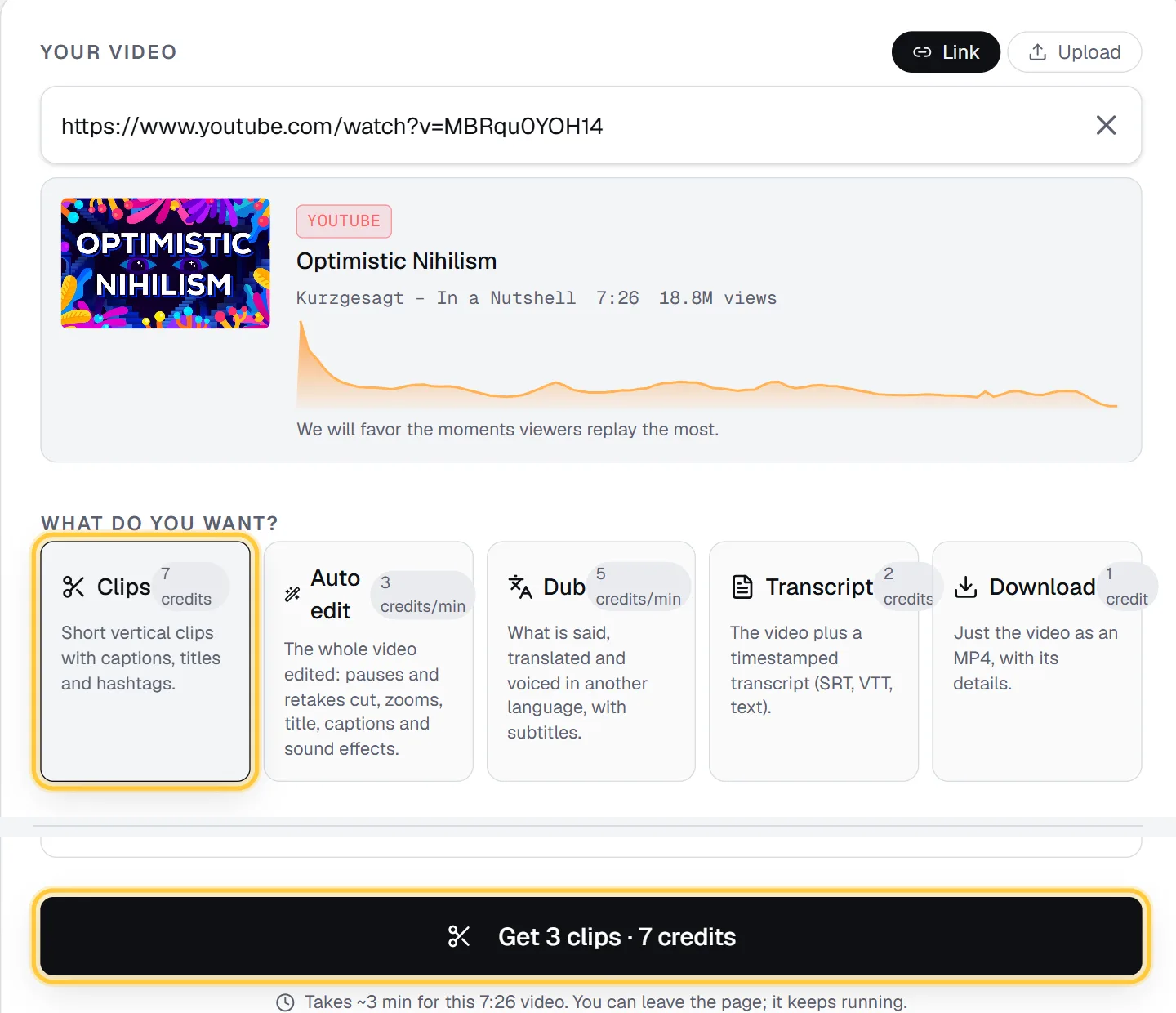
What it is: a video API and web app. Paste a link (YouTube, TikTok, Instagram, X, Facebook) or upload a file up to 2 GB, and get captioned vertical clips with titles, hooks and hashtags. The same account does auto edits of talking-head videos, dubbing, transcripts, downloads and video rendering from JSON.
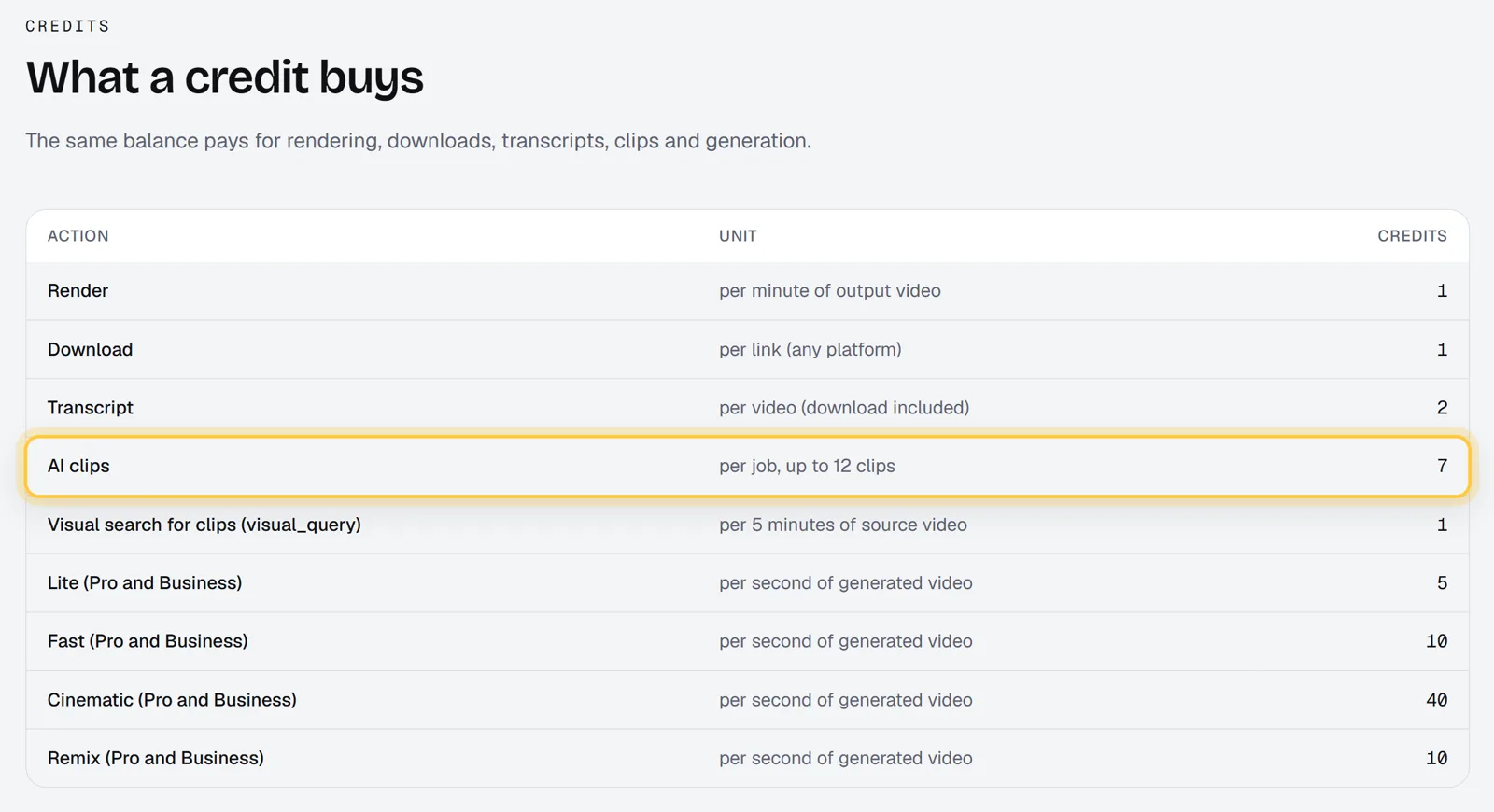
How it charges: a clips job costs 7 credits, whatever the length of the video, and returns up to 12 clips. On Starter ($29 for 600 credits), that's about $0.34 for a 60-minute podcast, and the same for a 2-hour one. Searching by what's on screen (for sports or gameplay with no talking) adds 1 credit per 5 minutes. Unused credits roll over up to 3 times your monthly allowance. Credit packs ($29 for 500 credits) never expire. See pricing.
What stands out:
- Price per video, not per minute. The longer your videos, the bigger the gap with per-minute tools.
- Clips that favor the "most replayed" moments of a YouTube video, using YouTube's own replay graph when it exists.
- Layouts for real shows: Two speakers (one above the other) for podcasts and Gaming (facecam on top) for streams, besides Auto (follow the subject).
- Topic search: ask only for moments about one subject.
- 11 caption styles and a caption position that stays clear of the buttons TikTok, Reels and Shorts draw over the video.
- Titles, hooks and captions in the language spoken, detected automatically.
- A score for each clip that mixes the AI rating, viewer replays and audio energy, with grades for hook, flow, value and trend.
- Export XML for Premiere Pro, DaVinci Resolve and Final Cut, if you want to finish by hand.
- Dubbing in 16 languages (5 credits per started minute, videos up to 20 minutes), so you can dub the clips too.
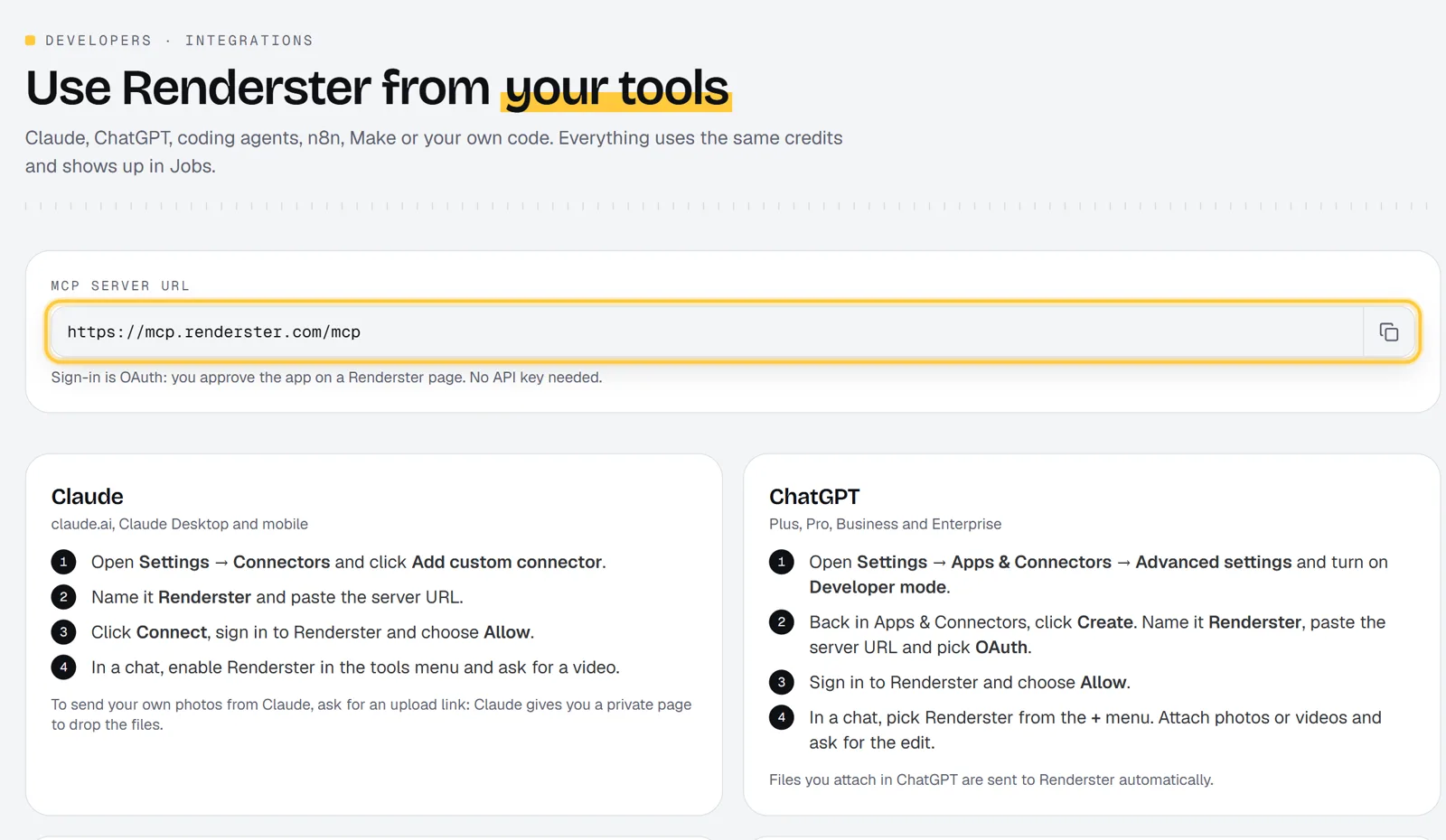
- REST API on every plan, including Free, with the same credit prices as the app, plus webhooks, n8n and Make, and an MCP connector for Claude and ChatGPT.
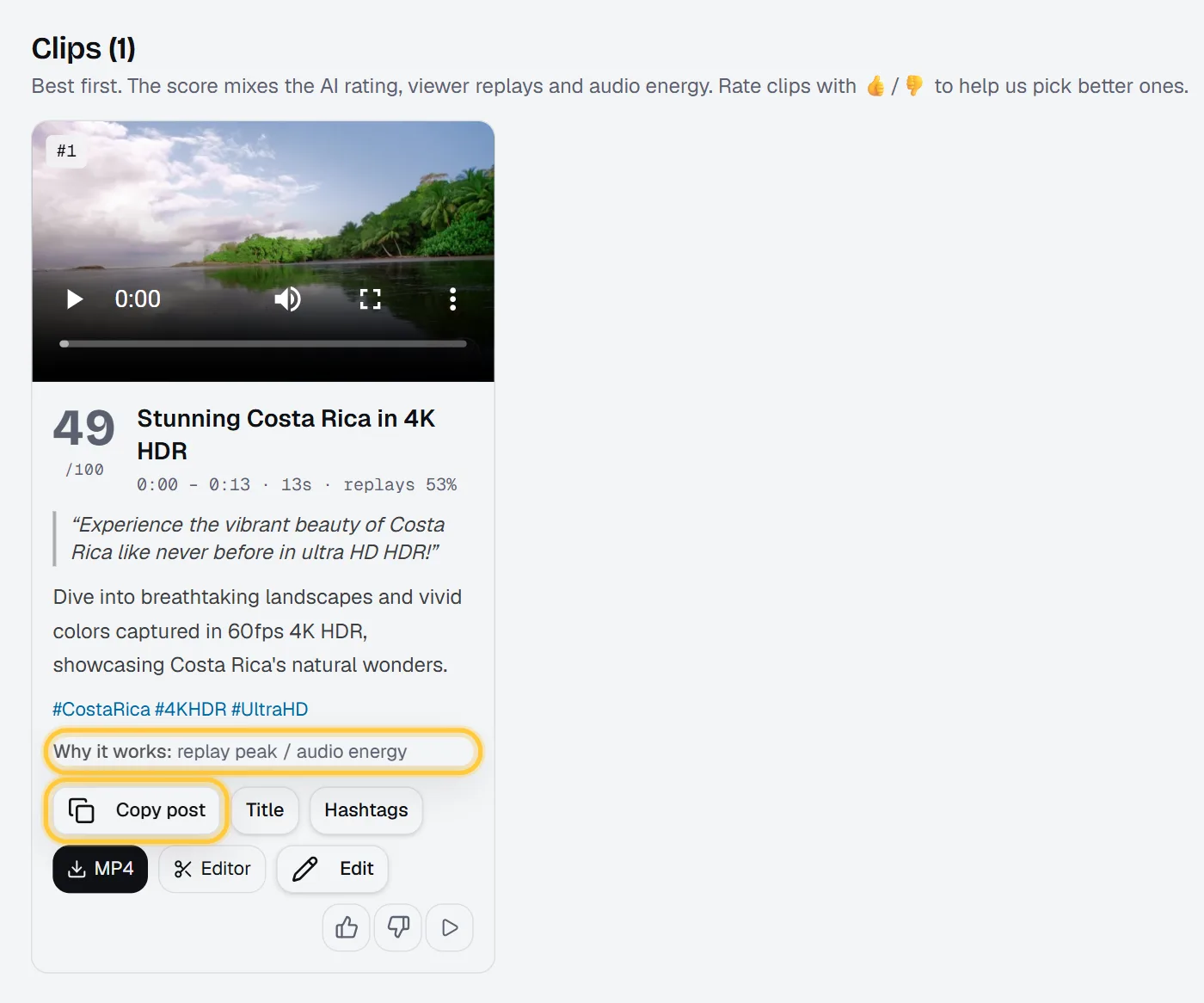
Free plan: 60 credits on signup and one clips job with up to 3 clips, with no watermark. Auto edit, dubbing, downloads, transcripts and more clips need a paid plan; every paid plan starts with a 7-day free trial with 100 credits.
Where OpusClip (and others) are better: Renderster doesn't post or schedule to social networks for you; you download the clips or send them somewhere with the API. 1440p and 4K clips are on Business only (for sources up to 30 minutes, at twice the clips price), and there's no team workspace with shared brand kits.
Pick it if: your videos are long (podcasts, webinars, streams, sermons, lectures), you clip many videos a month, or you want clips to happen automatically when a new video goes up. Full side by side: Renderster vs OpusClip.
2. Vizard
What it is: a polished clipping app with social publishing and team features.
How it charges: like OpusClip, "1 credit = 1 minute of video", according to Vizard's pricing page (October 2026). An hour of video uses 60 credits. The page showed credit tiers but no dollar amounts in the version we could read, so we don't print a price here; check the page for the current one.
Free plan: 60 credits a month, with a watermark, 720p export, a 10-minute maximum export length, 3-day storage and a 1 GB upload limit. The paid Creator plan removes the watermark, adds 4K export, 30 GB uploads, post scheduling and subtitle translation.
What stands out: scheduling to several social accounts (6 on Creator, 20 on Business), team seats, a shared workspace and a brand kit with custom fonts on Business. The API is on every plan, with rate limits by plan (from 1 request a minute on Free to 10 on Business).
Where it's better than Renderster: social scheduling, team brand kits and 4K on its Creator plan.
Where it's weaker: per-minute pricing for long videos, and the free plan's watermark and 720p. Side by side: Renderster vs Vizard.
3. Klap
What it is: a clipping app that charges per clip, with publishing to TikTok, Instagram and LinkedIn.
How it charges: from Klap's pricing page (October 2026), all billed yearly: Basic $14/month for 100 clips, Pro $39/month for 300 clips, Pro+ $94/month for 1,000 clips. That's about $0.14 per clip on Basic. If you keep 10 clips from a 60-minute podcast, that's about $1.40, no matter how long the podcast is. The page only shows yearly prices.
API: pay per operation, from Klap's API docs: $0.44 per video input, $0.32 per generated short, $0.48 per export.
What stands out: per-clip pricing is easy to predict, and every plan includes unlimited social accounts and analytics.
Where it's better: if you want to publish to many social accounts from the same app, and you're fine paying yearly.
Where it's weaker: the lowest prices need a yearly commitment, and the page doesn't list a free plan. Side by side: Renderster vs Klap.
4. Submagic
What it is: an editor for short videos, famous for its animated captions, with B-roll, transitions and effects. It also has Magic Clips, which turns a long video (a YouTube link or an upload) into shorts, per its Magic Clips page.
How it charges: from Submagic's pricing page (October 2026):
| Plan | Monthly | Billed yearly | Videos a month | Max video length |
|---|---|---|---|---|
| Starter | $19 | $12/month | 15 | 2 minutes |
| Pro | $39 | $23/month | 40 | 5 minutes |
| Business | $69 | $41/month | 100 | 30 minutes |
There's a free trial with no credit card. API minutes are sold by plan, with add-on packs from $0.23 down to $0.10 per minute.
What stands out: caption design and the finishing touches on short videos. If you already have a 45-second clip and want it to look great, Submagic is built for that.
Where it's better: caption styles, effects and B-roll on short videos, and 4K at 60 fps on Business.
Where it's weaker for OpusClip users: the maximum video length (30 minutes even on Business) doesn't fit a full podcast episode in one go. Side by side: Renderster vs Submagic.
5. Reap
What it is: a clipping and captioning tool with strong language support, an API and an MCP connector.
How it charges: hours of clipping per month, from Reap's pricing page (October 2026):
- Free: up to 1 hour a month, watermarked, 720p, uploads up to 5 GB.
- Creator: $24/month, or $9.99/month billed yearly ($119.88 a year). Up to 10 hours of clipping, 1080p, dubbing in 80+ languages (up to 2 hours a month), API access, publishing to TikTok, Reels, Shorts and LinkedIn.
- Studio: $50/month, or $29/month billed yearly. Up to 20 hours, 4K, 5 hours of dubbing, "MCP-ready workflows".
A 60-minute video uses one of your 10 hours on Creator, about $2.40 on monthly billing or about $1.00 on yearly.
What stands out: captions in 100+ languages and dubbing in 80+.
Where it's better than Renderster: language coverage. Renderster dubs into 16 languages; Reap lists 80+. Reap also publishes to social networks and offers 4K on Studio.
Where it's weaker: hourly allowances cap how much you can clip, and the free plan is watermarked. Side by side: Renderster vs Reap.
6. Descript
What it is: a full video and podcast editor where you edit by editing the transcript. Clipping ("Create clips, highlights") is one of many features, not the main one.
How it charges: media hours per month, per person, from Descript's pricing page (October 2026):
- Free: 60 minutes a month, 720p export with a watermark.
- Hobbyist: $16/person/month billed yearly, $24 billed monthly. 10 media hours, 1080p.
- Creator: $24/person/month billed yearly, $35 billed monthly. 30 media hours, 4K.
- Business: $50/person/month billed yearly, $65 billed monthly. 40 media hours.
What stands out: precise editing. Removing filler words and retakes, rewriting with the transcript, multitrack audio, and dubbing (30 languages, limited on Creator).
Where it's better: when you want to edit the full episode carefully, not just pull clips out of it.
Where it's weaker: it's an editor, so clips still take manual work, and the media hours are shared with everything else you do in it. If what you want is a finished talking-head video rather than an editor, see Descript Alternatives for Talking-Head Videos.
7. CapCut (free, manual)
What it is: the free editor most creators already have. Its pricing page lists a "Long video to shorts" tool ("Turn your long videos into shareable shorts in 1 click"), and the desktop app has auto captions and a filler-word remover.
How it charges: a free app with paid Pro plans. The pricing page shows prices in your local currency, and they vary by country, so we don't print one here.
Where it's better: price (you probably already have it) and full manual control: every cut, every caption, every transition.
Where it's weaker: it's built for editing by hand. For one video a week that's fine. For a podcast with 3 episodes a week, the hours add up. There's no public API to automate clipping.
Which one should you pick?
| If you… | Pick |
|---|---|
| Clip long videos (40+ minutes) often | Renderster (per-video price) |
| Want clips made automatically when a video goes up | Renderster (API on every plan, n8n, MCP) |
| Need to schedule posts to many accounts from one app | Vizard, Klap or Reap |
| Work in a team with a shared brand kit | Vizard (Business) |
| Need dubbing or captions in dozens of languages | Reap |
| Already have short clips and want great captions and effects | Submagic |
| Want to edit the full episode by its transcript | Descript |
| Have time and no budget | CapCut |
| Like OpusClip's app and your videos are short | Stay on OpusClip |
The last row is honest: if your videos are 10 minutes long, per-minute pricing costs little, and OpusClip's scheduling and team features may be worth it.
The cost gap, month by month
Here's what each pricing model means for a podcast that publishes four 60-minute episodes a month (240 minutes of source video):
| Tool | What 4 episodes use | Fits the entry plan? |
|---|---|---|
| Renderster | 28 credits (4 × 7) | Yes, 600 credits on Starter |
| OpusClip | 240 credits | No: Starter has 150; Pro (300 credits, $29) fits |
| Vizard | 240 credits | Check the tier you pick |
| Reap | 4 hours | Yes, 10 hours on Creator |
| Submagic | Episodes too long for one video | Must split each episode |
On Renderster, the rest of the Starter credits can go to auto edits, dubbing or more clips.
Do it automatically
The biggest difference between these tools may not be the price but the work. With Renderster's API, a new episode can become clips with no clicks: an n8n flow watches your channel, sends the link to POST /media, and gets the clips by webhook. We walk through it in How to Automate YouTube Shorts With n8n. If you live in Claude or ChatGPT, the same works by asking in plain words through the Renderster connector.
FAQ
What is the best free OpusClip alternative?
It depends on what "free" must include. Renderster's Free plan gives one clips job with up to 3 clips and no watermark. Vizard gives 60 credits a month with a watermark at 720p, and Reap one hour a month, watermarked at 720p. CapCut is free if you cut by hand.
Is there an OpusClip alternative without a watermark?
Yes. Renderster's free clips have no watermark. On the free plans of OpusClip, Vizard, Reap and Descript, exports are watermarked, while their paid plans (and Submagic's) are listed as watermark-free, according to their pricing pages as of October 2026.
Which OpusClip alternative is cheapest for long podcasts?
A tool that charges per video instead of per minute. On Renderster a clips job costs 7 credits whatever the length, about $0.34 for a 60-minute episode on Starter. On per-minute tools like OpusClip and Vizard, the same episode uses 60 credits.
Does any alternative have an API like OpusClip?
Yes. Renderster has an API on every plan with no minimum per job. Vizard has one on every plan with rate limits by plan, Reap on Creator and up, Klap per operation, and Submagic by minutes per plan. OpusClip's API starts on Pro (Beta) with a 10-credit minimum per project.
Can I dub clips into other languages?
Renderster dubs into 16 languages (5 credits per minute), OpusClip has dubbing on Pro, Descript dubs into 30 languages, and Reap lists 80+ dubbing languages on its paid plans.
Did you test all these tools on the same video?
No. This comparison uses each tool's official pricing and feature pages, checked on October 10, 2026, with links. We suggest running one of your own videos through two or three of them before you pay.