OpusClip Pricing Explained: What a 60-Minute Podcast Really Costs (2026)
OpusClip pricing explained: plans, how credits work, what 10 to 240 minutes a month cost, the API's 10-credit minimum, and cheaper per-video options.
The short answer: OpusClip charges by the length of the video you upload, not by the clips you get.
- 1 credit = 1 minute of source video, so a 60-minute podcast uses 60 credits.
- Starter is $15/month for 150 credits; Pro is $29/month for 300.
- That makes one 60-minute video about $6.00 on Starter or $5.80 on Pro.
See what the same hour costs per video →
How we checked these numbers
Everything about OpusClip in this post comes from its own pages, read on October 10, 2026: the pricing page, the help articles How Do Credits Work? and Plans, and the API overview. Where a page doesn't state something, we say so instead of guessing. Prices change, so check those pages before you buy.
Renderster is our product. We include it at the end as one of the per-video alternatives, and we compare it with the same math.
OpusClip plans at a glance
As of October 2026:
| Plan | Price | Credits (processing minutes) | Notable limits |
|---|---|---|---|
| Free | $0 | 60 a month (per the Plans help article) | Watermark on exports, clips kept 3 days, up to 1080p, uploads up to 10 GB |
| Starter | $15/month | 150 a month | Watermark-free, uploads up to 10 GB |
| Pro | $29/month | 300 a month, or 3,600 a year on yearly billing | Team workspace (2 users per pack, up to 4), social scheduling, video dubbing, API (Beta), uploads up to 30 GB |
| Business | Custom | Custom | 4K, unlimited seats, dedicated queue |
A few details from the same pages that matter for your bill:
- The help center says Pro is the only plan offered on a monthly or yearly cycle. The pricing page we read showed monthly prices only, so we don't print a yearly price.
- The credits article also lists a Max plan with 1,500 credits per pack. The public pricing page we read didn't show Max, so ask OpusClip about it if you need that volume.
- Virality score and watermark-free export are on Starter and up. Export to Adobe Premiere Pro & DaVinci Resolve is listed too.
- 4K ("4K schedule and download") is on Business only.
How credits work (1 credit = 1 source minute)
OpusClip's help article puts it plainly: "processing clips will cost 1 credit per minute of the original video imported."
Three things follow from that rule:
- You pay for the minutes you upload, not for the clips you keep. A 60-minute podcast costs 60 credits whether you post 2 clips or 20.
- Rounding is in your favor on long videos. Videos under a minute are rounded up to 1 minute, but partial minutes on longer videos are rounded down. A 59-minute-50-second video counts as 59 credits.
- Long videos eat the plan fast. Starter's 150 credits cover two and a half hours of source video a month. That's two podcast episodes and a half.
There's one more charge in the same article: posting to X costs 3 credits per clip, per X account. If a post fails or you delete a scheduled post, the frozen credits come back.
Do OpusClip credits roll over?
Partly. On monthly plans, credits expire after 60 days, so unused credits roll over for one month and then disappear. On yearly plans, credits are valid for 12 months. There's no long-term bank of credits: if you skip two months, you lose the first month's credits.
Monthly or yearly?
According to the Plans help article, Pro is the only plan offered on both cycles, with 300 credits a month or 3,600 a year. The yearly version is the more flexible one for uneven schedules: credits are valid for 12 months, so a busy season can use credits a quiet season didn't. The trade-off is paying for the year up front. The pricing page we read didn't show the yearly price, so compare it on the checkout page before you commit.
A simple rule: if your monthly minutes swing a lot (a seasonal show, a course you record in bursts), yearly fits better. If they're steady and you might cancel, stay monthly.
What 10, 30, 60, 120 and 240 minutes a month cost
Here's the calculator in table form. "Effective cost per hour" is the monthly price divided by the hours you actually use, which is what you're really paying if you don't use the full plan.
| Source minutes a month | Credits used | Smallest plan that fits | Monthly price | Effective cost per hour of video |
|---|---|---|---|---|
| 10 | 10 | Free (with watermark) or Starter | $0 or $15 | $0 or $90.00 |
| 30 | 30 | Free (with watermark) or Starter | $0 or $15 | $0 or $30.00 |
| 60 | 60 | Starter | $15 | $15.00 |
| 120 | 120 | Starter | $15 | $7.50 |
| 240 (a weekly 1-hour podcast) | 240 | Pro | $29 | $7.25 |
| 300 | 300 | Pro | $29 | $5.80 |
If you use the whole plan, the floor is $0.10 per minute on Starter ($15 ÷ 150) and about $0.097 per minute on Pro ($29 ÷ 300). So a 60-minute video costs about $6.00 on Starter and $5.80 on Pro at best, and more if you don't use every credit.
Beyond 300 minutes a month, you're looking at more Pro packs, the Max plan mentioned in the help center, or Business with a custom contract. The public pricing page doesn't list prices for those, so we can't put them in the table.
Three real scenarios
A weekly interview podcast, 60 minutes per episode. 4 episodes a month = 240 credits. Starter (150) is not enough, so it's Pro at $29 a month. If one month has 5 episodes, that's 300 credits, the whole Pro allowance.
A daily 2-hour livestream, clipped once a week. If you clip the full VODs, that's 7 × 120 = 840 minutes a week, about 3,600 a month. That's past Pro, into Max or Business territory. Most streamers in this case only upload the best hour, which is still 1,800 credits a month.
A solo YouTuber with 12-minute videos, 6 a month. 72 credits a month. Starter covers it with room to spare. For short videos, per-minute pricing is cheap and OpusClip is a reasonable choice.
API pricing and the 10-credit minimum
The OpusClip API uses the same unit: "1 Credit = 1 minute of video processing." From the API overview, as of October 2026:
- Plans: API access is on Pro (Beta), Max and Business. Not on Free or Starter.
- Minimum: "API projects have a 10-credit minimum." A 3-minute video sent through the API costs 10 credits, not 3.
- Monthly cap: Pro (Beta) and Max include 15 hours of API video per month. Business is per contract.
- Rate limit: 30 requests per minute per API key.
- Extras: six official SDKs (Node, Python, Go, PHP, Ruby, Java), an OpenAPI spec and an MCP server, per the API page.
The 10-credit minimum matters if you automate short videos. If your automation sends 100 videos of 2 minutes each, you pay 1,000 credits instead of 200. For long videos it doesn't change anything: a 60-minute video is 60 credits either way.
The API is good. The SDK coverage is wider than most competitors. The cost model is what you need to plan around.
Hidden costs to watch for
None of these are tricks, but they're easy to miss when you compare plans:
- Unused credits expire. On monthly plans, credits last 60 days. A slow month followed by a busy month doesn't average out beyond that.
- Long videos you only half need. The credits article counts "per minute of the original video imported". If you only want clips from the first 20 minutes of a 90-minute stream, trim it before you upload, or ask OpusClip whether picking a clipping timeframe lowers the charge (the pages we read don't say).
- Posting to X. 3 credits per clip, per X account.
- The API minimum of 10 credits per project, for short videos.
- 4K is Business-only. If your workflow needs 4K exports, Starter and Pro won't cover it.
- Team seats. Pro includes 2 users per pack, up to 4. A bigger team means Business.
How to spend fewer OpusClip credits
If you're staying on OpusClip, a few habits stretch the plan:
- Trim before you upload. Cut the intro, the sponsor read, the dead air before the stream starts and the Q&A you never clip. A 75-minute episode trimmed to 55 saves 20 credits every time.
- Upload the part you'll clip, not the whole archive. For a 3-hour stream, pick the best hour by your chat activity or by YouTube's replay graph (our free most replayed tool lists the peaks), and upload only that.
- Think before you re-import. Each import is counted by the minutes of the video. Before importing the same video again for different clips, check whether reprompting (listed on the paid plans of the pricing page) gets you what you need.
- Watch the 60-day clock. Monthly credits roll over one month. If you know a slow month is coming, process your backlog before the older credits expire.
- Batch API work into longer videos. With the 10-credit minimum per API project, sending one 10-minute compilation costs the same as one 2-minute clip.
Is OpusClip worth it?
It depends almost entirely on the length of your videos.
- Short videos (under 15 minutes), a few a month: yes, it's cheap. Starter's 150 credits cover ten 15-minute videos, and you get a polished app with virality scores and Premiere/DaVinci export.
- Long videos (40 minutes and up), every week: the per-minute model starts to hurt. A weekly 1-hour show needs Pro; a daily one needs Max or Business. This is where people start comparing.
- Teams that schedule posts to social networks: Pro's scheduling and team workspace are features some alternatives don't have at all. Factor that into the price.
- Developers automating clips: the API is well documented with six SDKs, but it starts on Pro (Beta) with a 10-credit minimum and a 15-hour monthly cap. Check those three numbers against your volume.
Cheaper per-video alternatives
If your videos are long, the fix isn't a different per-minute plan: it's a different pricing model. Tools that charge per video or per clip don't care whether your episode is 20 minutes or 2 hours. We compare seven of them in 7 OpusClip Alternatives in 2026. Here's the short version for the one we know best.
The same math on Renderster
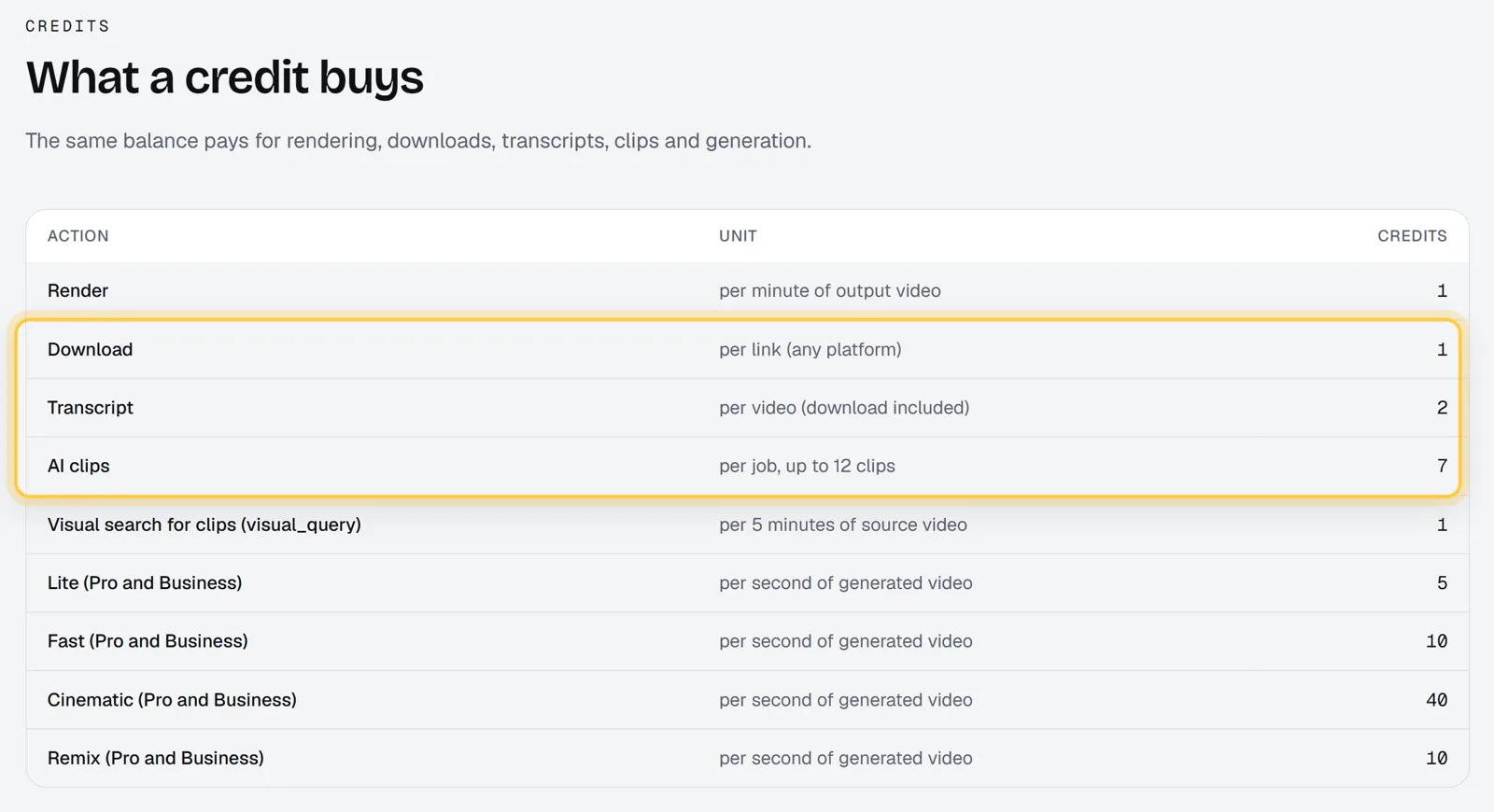
Renderster charges 7 credits per clips job, whatever the length of the video. A job returns up to 12 captioned vertical clips with titles, hooks and hashtags. From our pricing page:
| OpusClip | Renderster | |
|---|---|---|
| How clips are charged | 1 credit per source minute | 7 credits per video |
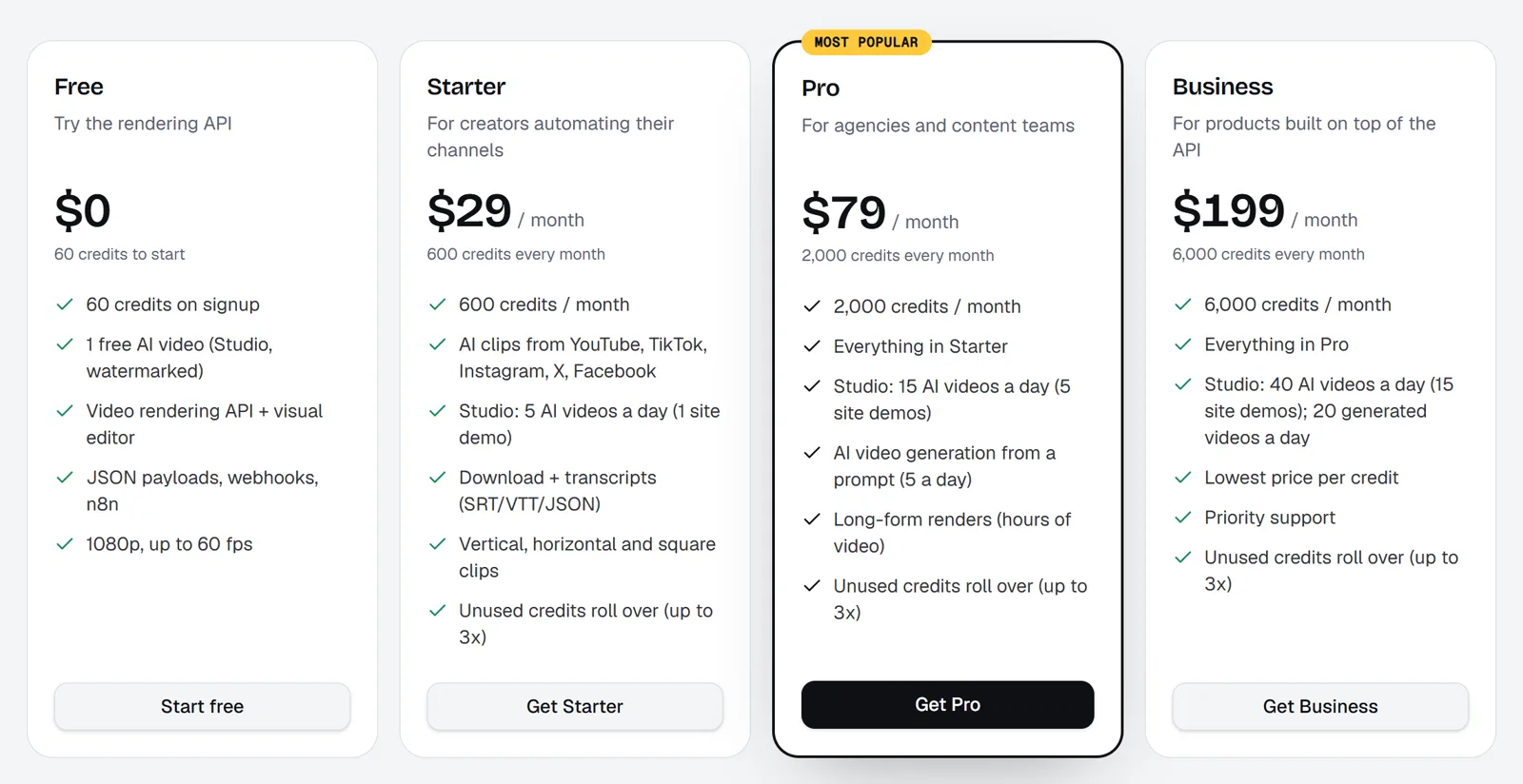
| Entry paid plan | $15/month, 150 credits | $29/month, 600 credits |
| One 60-minute podcast | 60 credits (about $5.80–6.00) | 7 credits (about $0.34 on Starter) |
| A 2-hour stream | 120 credits | 7 credits |
| A weekly 1-hour podcast, per month | 240 credits (Pro, $29) | 28 credits (Starter, with 572 left) |
| Unused credits | Expire after 60 days (monthly plans) | Roll over up to 3× your monthly allowance while the plan is active; credit packs never expire |
| API | Pro (Beta) and up, 10-credit minimum | Every plan, including Free, no minimum, same price as the app |
| Failed jobs | Not stated on the pages we read | Credits back automatically |
| Free plan | Watermark, 3-day storage | 60 credits once, one clips job with up to 3 clips, no watermark |
A few honest caveats on our side:
- The entry price is higher. Renderster's cheapest plan is $29, OpusClip's is $15. If you clip two short videos a month, OpusClip Starter is cheaper.
- Some features cost extra credits. Searching by what's on screen (for sports or gameplay) adds 1 credit per 5 minutes. 1440p and 4K clips are on Business only, for videos up to 30 minutes, at twice the clips price.
- No social scheduling. Renderster gives you the clips (and an API to send them anywhere) but doesn't post for you. OpusClip does.
The 600 credits on Starter aren't only for clips. The same balance pays for auto edits of talking-head videos (3 credits per minute), dubbing into 16 languages (5 credits per minute), transcripts (2 credits) and downloads (1 credit). Every paid plan has a 7-day free trial with 100 credits.
Where to see what you spent
On Renderster, the Usage page in your account ("Where your credits go") shows credits by day and every job with what it cost. A clips job on a 60-minute podcast shows up as one line of 7 credits.
For the side-by-side of features, not just price, see Renderster vs OpusClip.
Do it automatically
If you're comparing API costs, here's what a clips job looks like on Renderster. One call, no minimum, 7 credits:
curl -X POST https://renderster.com/media \
  -H "X-API-Key: YOUR_API_KEY" \
  -H "Content-Type: application/json" \
  -d '{"type": "clips", "url": "https://www.youtube.com/watch?v=VIDEO_ID"}'
The answer has the job id and a status_url; add a webhook_url to be called when the clips are ready. To run it on every new episode, see How to Automate YouTube Shorts With n8n. All fields are in the API docs.
FAQ
How much does OpusClip cost?
As of October 2026, OpusClip's pricing page lists Free ($0), Starter ($15/month) and Pro ($29/month), plus a custom Business plan. Starter includes 150 credits a month and Pro 300. One credit is one minute of source video.
How do OpusClip credits work?
Processing costs 1 credit per minute of the original video you import, no matter how many clips you keep. Videos under a minute round up to 1 credit; longer videos round partial minutes down. Posting to X costs 3 credits per clip, per X account.
Do OpusClip credits expire?
Yes. On monthly plans, credits expire after 60 days, which gives you one month of rollover. On yearly plans, credits are valid for 12 months.
What does the OpusClip free plan include?
According to OpusClip's help center, the Free plan includes 60 processing minutes a month. Exports carry a watermark, clips are kept for 3 days, and quality goes up to 1080p. Watermark-free export starts on Starter.
How much does the OpusClip API cost?
The API uses the same credits (1 credit per minute), is available on Pro (Beta), Max and Business, and has a 10-credit minimum per project. Pro (Beta) and Max include 15 hours of API video per month.
Is there a cheaper alternative for long videos?
Tools that charge per video instead of per minute. On Renderster, a clips job is 7 credits whatever the length, about $0.34 for a 60-minute podcast on Starter, with the API on every plan. For short videos, OpusClip's per-minute pricing is already cheap.