Shotstack Alternatives: 6 Video Editing APIs Compared on Price per Minute
Shotstack alternatives compared on price per rendered minute, from each official pricing page as of October 2026: Renderster, Creatomate, JSON2Video.
The short answer, if you're leaving Shotstack:
- Lowest price per minute of video: Renderster, about US$0.033 to US$0.048 per rendered 1080p minute on its plans.
- Templates and a no-code editor for teams: Creatomate or Shotstack itself.
- After Effects templates: Plainly. Full control in React, on your own servers: Remotion.
Every price below comes from the vendor's own pricing page, checked in October 2026. Try Renderster's API free →
A note on method before the numbers: we didn't run these services side by side. What we did is read each official pricing page on the same day and turn its numbers into the same unit, dollars per minute of video, and show the math. Prices change, so click the source links before you decide.
What to compare in a video editing API
Price is the obvious one, but "price per minute" hides a few traps. Here's what to check:
- What a minute means. Most APIs charge per minute of output video. Editframe charges per minute of server processing time. Creatomate charges credits that depend on resolution and frame rate.
- Rounding. Some bill by the second, some round each video up to the minute. For 15-second videos this changes the price per video a lot.
- Resolution. A 720p minute and a 4K minute are not the same price anywhere.
- Free tier and watermark. How far can you get before paying?
- Templates and a visual editor. Can a non-developer change the design without touching JSON?
- How long files are kept. Some keep renders 30 days, others 24 hours.
- Webhooks, previews, retries. Do you get a free low-res preview? Is there idempotency, so a retry doesn't render (and charge) twice?
- What else the API does. Some only render JSON. Some also cut clips, transcribe or dub.
Price per rendered minute (table)
All prices in USD, monthly billing unless noted, as of October 2026. "Per minute" is the plan price divided by the minutes it includes.
| API | Entry plan | Per minute on entry plan | Lowest listed per minute | How it's measured |
|---|---|---|---|---|
| Renderster | Starter US$29 (600 credits) | ~US$0.048 (1080p) | ~US$0.033 on Business (US$199) | 1 credit per started minute of output |
| Shotstack | Starter US$39 (250 min) | US$0.156 | US$0.05 on Volume (US$499) | Minutes of output; US$0.20 pay-as-you-go |
| Creatomate | Essential US$54 (2,000 credits) | ~US$0.38 (720p) | ~US$0.09 on Beyond (US$329, 720p) | ~14 credits per 720p minute at 25 fps |
| JSON2Video | Professional US$49.95 (200 min) | ~US$0.25 | ~US$0.20 on Startup (US$99.95) | 1 credit per second of output |
| Editframe | Cloud US$99/mo + usage | US$0.02 per processing minute (≤2 MP, e.g. 1080p) | same | Server processing time, not video length |
| Plainly | Starter US$69 (50 min) | ~US$1.38 | ~US$1.08 on Pro (US$649) | Seconds of exported video |
| Remotion | Free up to 3 people | Your own servers | US$0.01 per render (US$100/mo minimum) for companies | A license, plus your compute |
Sources: Renderster, Shotstack, Creatomate, JSON2Video, Editframe, Plainly, Remotion. The Creatomate per-minute figures are our math from its statement that "one minute of video at 720p (25 fps) is about 14 credits"; 1080p uses more credits.
And for short videos?
Most API videos are short: ads, listings, quote cards. Here is one 15-second video:
| API | One 15-second video | Why |
|---|---|---|
| Renderster | 1 credit: ~US$0.033–0.048 | Rounded up to one minute |
| JSON2Video | 15 credits: ~US$0.05–0.08 | Per second; depends on the plan |
| Creatomate | ~3.5 credits at 720p: ~US$0.045 on Growth, ~US$0.095 on Essential | Our math from 14 credits/minute |
| Shotstack | US$0.039 on Starter if billed by the second | Its pricing page doesn't say how short renders round; check its docs |
| Plainly | ~US$0.27–0.35 | Per second, no rounding (its FAQ) |
Our minute rounding is the weak spot here. For very short videos at high volume, a per-second plan can match or beat us, so run your own numbers.
1. Renderster
What it is: a REST API that renders video from JSON, plus a visual editor, templates and a bulk page, in the same account as AI clipping, transcripts, dubbing and auto editing.
Price (as of October 2026): Free gives 60 credits once. Starter is US$29 a month for 600 credits, Pro US$79 for 2,000, Business US$199 for 6,000. A Credit Pack is US$29 for 500 credits that never expire. A render costs 1 credit per started minute at 1080p; 4K (Business plan) costs twice. Unused credits roll over, up to 3x your monthly credits. Details on /pricing.
What you get with the render API:
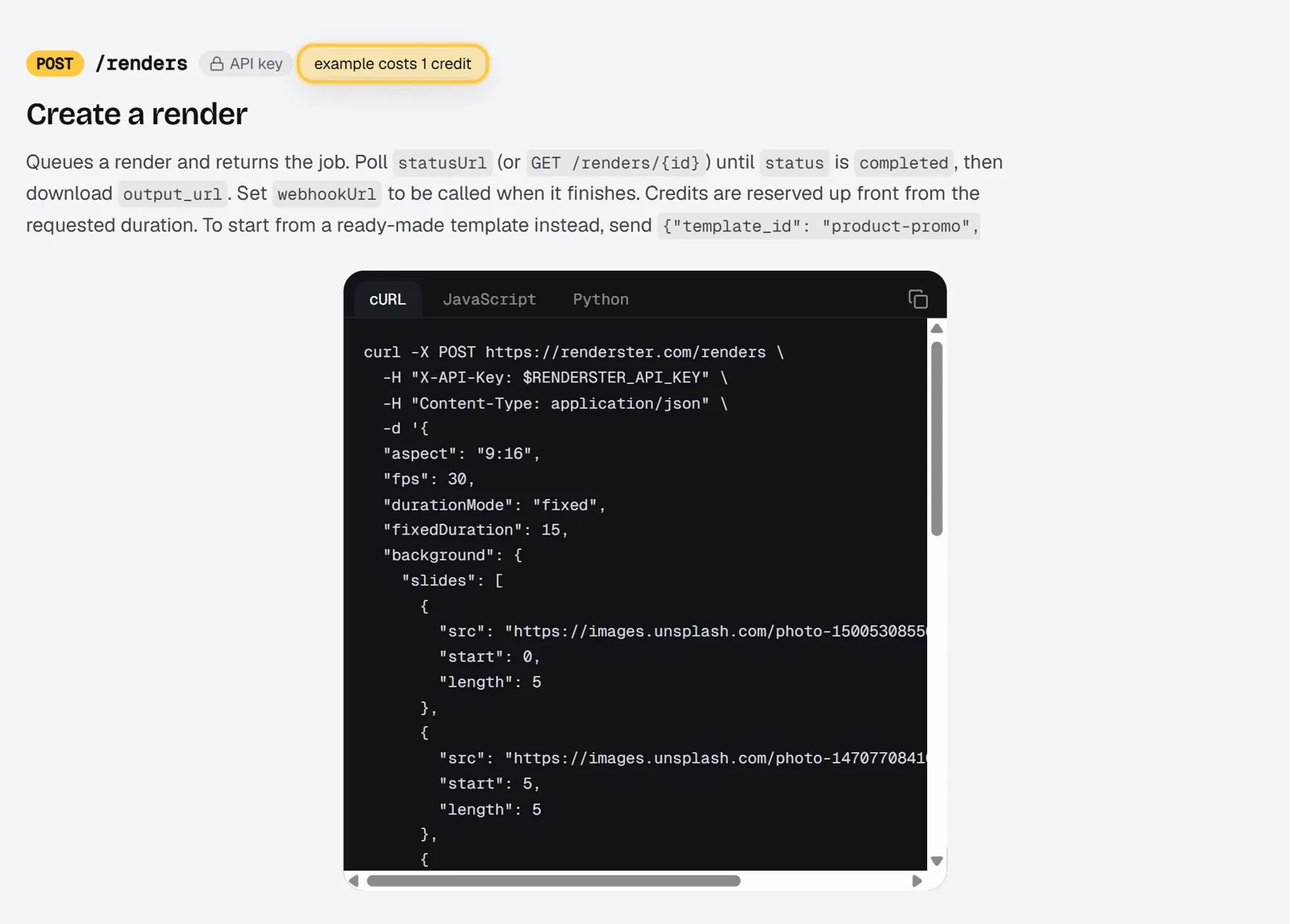
POST /renderswith a JSON body: background (color, image, video or slides), positioned text with animations, overlays with green-screen keying, captions or an SRT, music and voiceovers with ducking, a watermark. Full reference.POST /renders/preview: the same body rendered free at 480p with a "Preview" mark, 20 a day on paid plans and 5 on Free.- A sandbox key for test environments on paid plans: free 480p test renders up to 60 seconds, 50 a day.
- An
Idempotency-Keyheader, so a retry never renders twice. - Webhooks, and output files on signed renderster.com links kept for 30 days. You don't need your own bucket to share results.
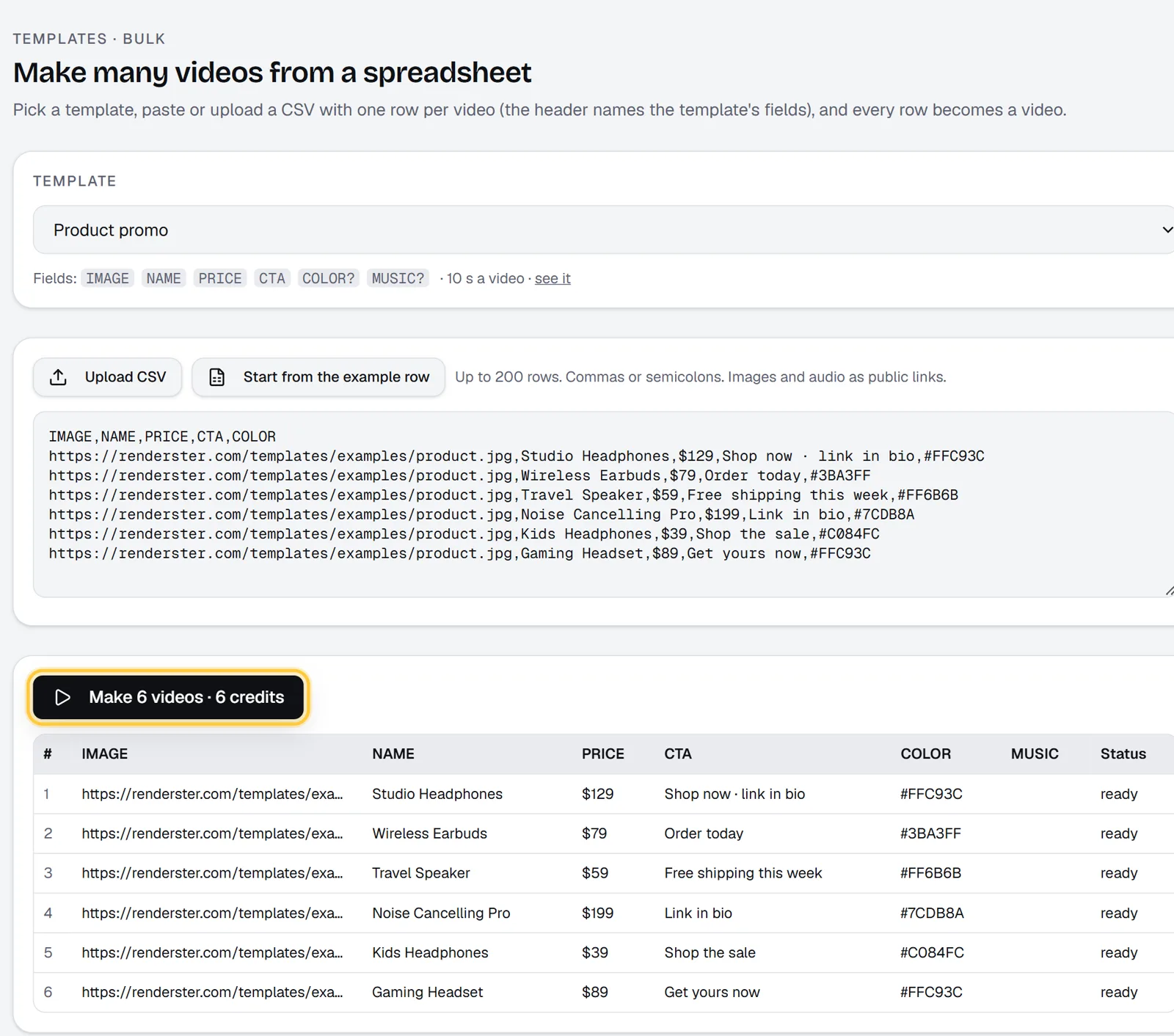
- A visual editor whose canvas uses the same geometry as the renderer, ten ready-made templates (plus community templates), and a bulk page that makes up to 200 videos from a CSV.
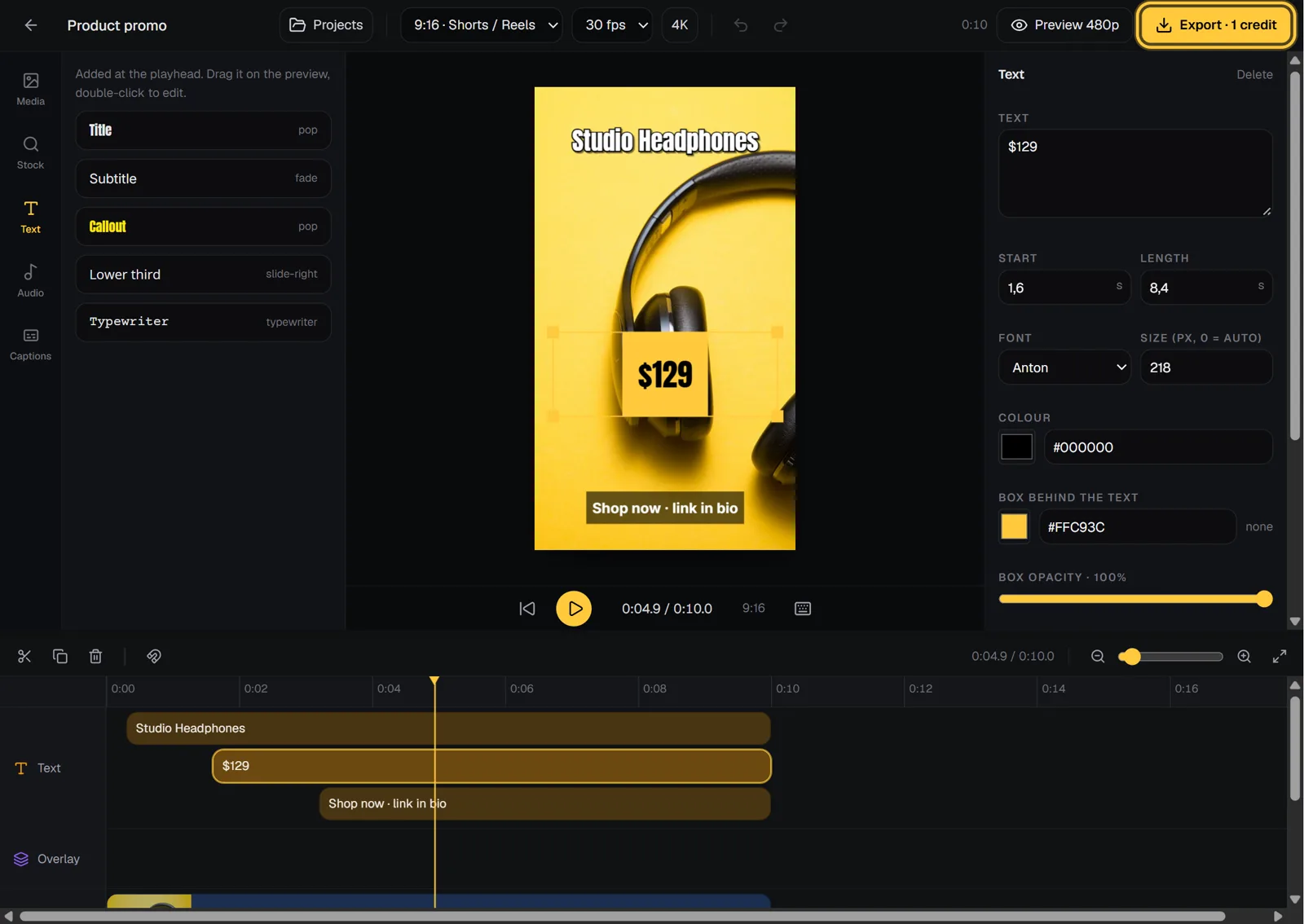
What no other API on this list does in the same account: the same key cuts clips from long videos (POST /media, 7 credits per video), downloads, transcribes, dubs into 16 languages and edits talking-head videos automatically. It also works from n8n with plain HTTP nodes and from Claude or ChatGPT through an MCP connector.
Watch out for: there's no white-label editor to embed in your own app, and the minute rounding makes very short videos relatively more expensive (see the table above).
Best for: developers and automation agencies who want the lowest cost per minute and more than rendering from one API.
2. Creatomate
What it is: a template-first video API with a web editor, spreadsheet "feeds" for bulk, and a JavaScript preview SDK.
Price (as of October 2026, source): Essential US$54 a month for 2,000 credits, Growth US$129 for 10,000, Beyond US$329 for 50,000 (annual billing lowers these to US$45, US$109 and US$274 a month). The trial is 50 credits with no card. The page says one 720p minute at 25 fps is about 14 credits, and that renders are kept for up to 30 days.
Good at: a template editor that non-developers can use, a JavaScript preview SDK to show the video in your own app before rendering, and images from the same templates (one credit each).
Watch out for: credits vary with resolution and frame rate, so estimate on your real format. The entry plan works out to roughly US$0.38 per 720p minute.
Best for: marketing teams and SaaS products that need a designer-friendly editor and in-app previews.
More detail: /vs/creatomate.
3. JSON2Video
What it is: a JSON-to-video API with built-in text-to-speech voices and component libraries.
Price (as of October 2026, source): the free account gets 600 credits (1 credit is 1 second, so 10 minutes). Subscriptions: Hobby at US$199.50 a year (shown as US$16.63 a month) for 50 minutes a month, Professional at US$49.95 for 200 minutes, Startup at US$99.95 for 500 minutes. Pre-paid packs: US$49.95 for 120 minutes and US$99.95 for 260 minutes, which don't expire. Max video length is 30 minutes, and 4K uses 4x the credits.
Good at: simple per-second billing, text-to-speech voices on every plan (its FAQ notes some external voice or transcription services cost extra), pre-paid credits that never expire.
Watch out for: subscription credits expire at the end of each month, and per-minute prices sit between US$0.20 and US$0.42 depending on the plan.
Best for: small projects that want text-to-speech in the same call and clear per-second billing.
More detail: /vs/json2video.
4. Editframe
What it is: a video SDK that renders in the browser (WebCodecs) or from a CLI, with an optional cloud for server-side rendering, storage and streaming.
Price (as of October 2026, source): free for individuals and companies of up to 3 people, US$49 a month for teams of 4 to 10, and Cloud at US$99 a month plus usage. Cloud render minutes are US$0.02 (up to 2 megapixels, like 1080p), US$0.04 (up to 4 MP) and US$0.07 (up to 9 MP, like 4K), measured as server processing time.
Good at: rendering on the user's machine for free, an embeddable editor and player.
Watch out for: the cloud price is per minute of processing, not per minute of video, so you can't compare it directly until you measure your own render times. The plan is set by company headcount.
Best for: teams building a video editor into their own product.
5. Plainly
What it is: an automation platform built on Adobe After Effects. You design templates in After Effects and Plainly renders versions with your data.
Price (as of October 2026, source): monthly billing is Starter US$69 for 50 minutes, Explorer US$134 for 100, Team US$259 for 200, Pro US$649 for 600; Unlimited starts at US$1,500. Yearly billing is lower. There's a 14-day free trial. Rendered videos are kept from 24 hours (Starter) to 7 days (Pro). Minutes count each exported second, with no rounding.
Good at: anything an After Effects designer can build, rendered at up to 4K, with many native integrations.
Watch out for: the highest price per minute on this list (around US$1.08 to US$1.38), short file retention, and you need After Effects skills to make templates.
Best for: brands and studios with motion designers who already work in After Effects.
6. Remotion (self-host)
What it is: an open framework to write videos as React components and render them on your own machines or your cloud account.
Price (as of October 2026, source): free for individuals and companies of up to 3 people. Companies of 4 or more need a Company License: "Remotion for Automators" is US$0.01 per render with a US$100 monthly minimum, and "Remotion for Creators" is US$25 a month per seat. Enterprise starts at US$500 a month. On top of the license, you pay for the servers or cloud functions that render.
Good at: total control. Anything React can draw, any data source, your infrastructure.
Watch out for: you build and run the rendering pipeline, the queue, retries and storage yourself. It's a framework, not a hosted API.
Best for: engineering teams who want videos as code and are fine operating the infrastructure.
When Shotstack is still the right pick
Shotstack has things the cheaper options here don't. Its pricing page lists a white-label editor and sandbox access on every plan, team seats from Starter, 4K from the Pro plan, and its per-minute price drops to US$0.05 at the Volume tier (US$499 for 10,000 minutes). If you need to embed an editor in your product under your own brand, or you render at enterprise volume with procurement needs, staying may cost less than switching.
The trade-off is the entry price: US$0.156 to US$0.20 a minute on the small plans, against about US$0.048 on Renderster's Starter. More detail: /vs/shotstack.
The same 15-second video, in Renderster's JSON
You can't paste one vendor's JSON into another; each has its own schema. To give a sense of Renderster's, here is a complete 15-second vertical video with three photos, a fade between them, slow zoom, music and a title:
{
  "aspect": "9:16",
  "fps": 30,
  "durationMode": "fixed",
  "fixedDuration": 15,
  "background": {
    "slides": [
      {"src": "https://images.unsplash.com/photo-1500530855697-b586d89ba3ee?w=1080", "length": 5},
      {"src": "https://images.unsplash.com/photo-1470770841072-f978cf4d019e?w=1080", "length": 5},
      {"src": "https://images.unsplash.com/photo-1441974231531-c6227db76b6e?w=1080", "length": 5}
    ],
    "slideTransition": {"type": "fade", "duration": 0.5}
  },
  "kenBurns": true,
  "audio": {"music": {"src": "https://cdn.pixabay.com/audio/2022/10/25/audio_946bc3eb1f.mp3", "gain": 0.8}},
  "captions": {
    "style": {"fontSize": 64, "color": "#FFFFFF", "align": "bottom", "marginV": 220},
    "items": [{"text": "Three places to see before 30", "start": 0.5, "length": 4}]
  },
  "webhookUrl": "https://example.com/hooks/render-done"
}
Send it with curl -X POST https://renderster.com/renders -H "X-API-Key: YOUR_API_KEY" -H "Content-Type: application/json" -d @video.json. It costs 1 credit. The JSON to video guide walks through Python and Node, templates and bulk.
If your team doesn't want to write JSON at all, the bulk page turns a CSV into one video per row from a template, and shows the total credit cost before it starts.
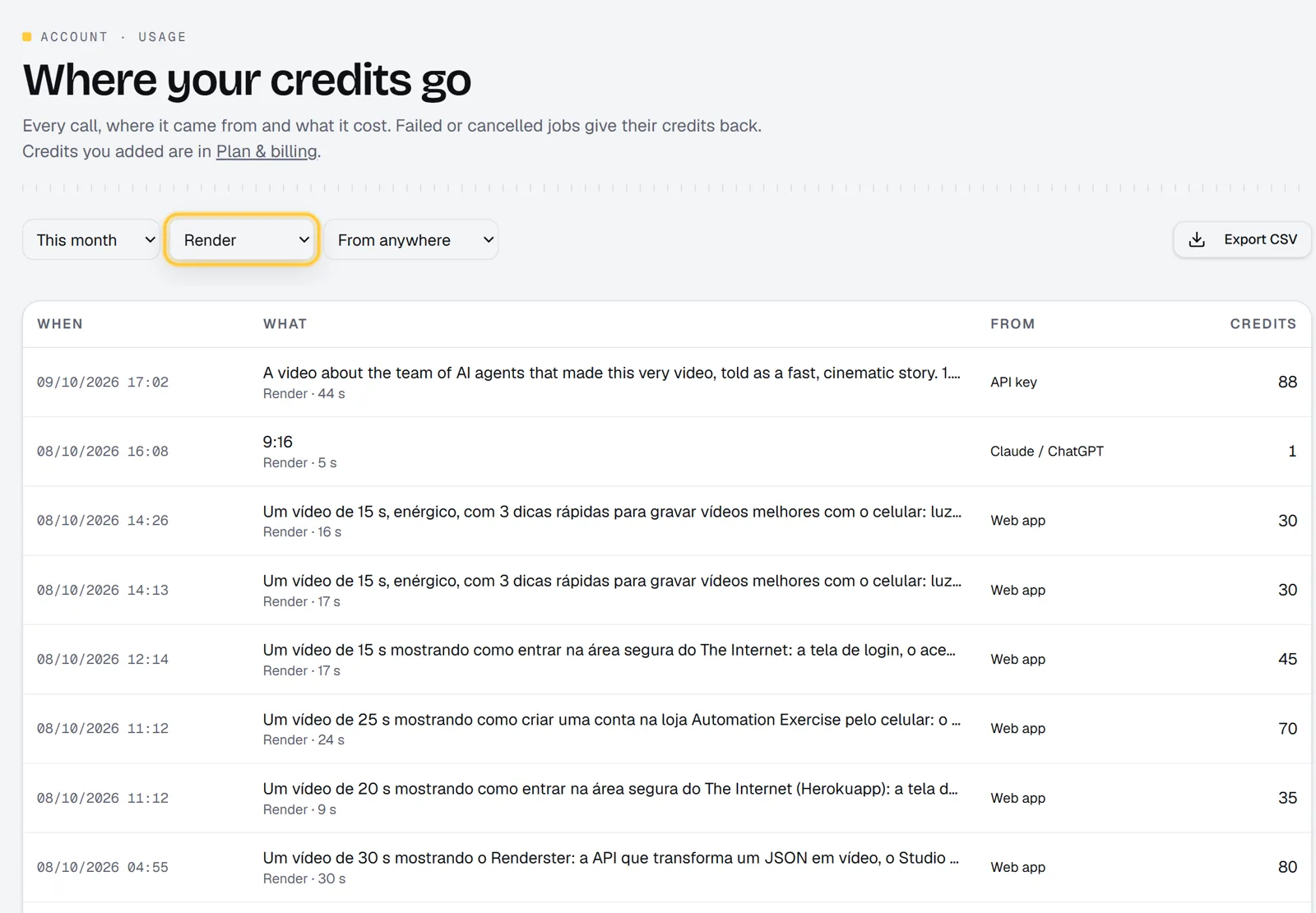
Every render and its cost shows up on the usage page, with where it came from (web, API, n8n, MCP), so you can check the per-minute math on your own bill.
How to switch without breaking things
- Map your templates. List the layers your Shotstack templates use (images, video clips, text, audio, captions). Most map one to one onto
background.slides,overlays,texts,captionsandaudio. - Rebuild one template and preview it. Use
POST /renders/preview(free) until it matches, then render it once for real. - Run both for a week. Send a small share of real jobs to the new API with an
Idempotency-Key, and compare output and cost. - Move file handling. If you copied outputs to your own bucket only to share them, you may not need to: Renderster's links are public, signed and kept 30 days.
- Switch the webhook. Point
webhookUrlat your existing handler and readid,statusandoutput_url.
FAQ
What is the cheapest alternative to Shotstack?
Among hosted APIs whose pricing pages we checked in October 2026, Renderster has the lowest price per rendered 1080p minute: about US$0.048 on its US$29 Starter plan and about US$0.033 on Business. Shotstack lists US$0.156 on Starter and US$0.05 at its US$499 Volume tier. Editframe's cloud bills processing time instead (US$0.02 a minute at 1080p plus US$99 a month), so measure your own render times to compare. Self-hosting Remotion can cost less at scale, but you run the servers.
Is there a free video editing API?
Several have free tiers. Renderster gives 60 credits on signup (up to 60 one-minute 1080p renders) and free 480p previews. JSON2Video gives 600 credits (10 minutes), Creatomate a 50-credit trial and Shotstack 10 credits for 30 days. Remotion and Editframe are free to self-run for companies of up to 3 people.
What's a good Creatomate alternative?
If you mostly need JSON or template rendering at a lower cost per minute, Renderster or JSON2Video. If you need Creatomate's in-app preview SDK or its designer-friendly editor for a marketing team, it may still be the better fit. See /vs/creatomate.
Which video API supports After Effects templates?
Plainly is built on After Effects: you design the template there and render versions through its API. The JSON-based APIs on this list (Renderster, Shotstack, Creatomate, JSON2Video) use their own layer formats instead.
Can a video API also cut clips from long videos?
Most render APIs only render. Renderster's same API key also cuts captioned clips from long videos (7 credits per video, whatever its length), transcribes, dubs and auto-edits. See the clipping API guide.
How often do these prices change?
Often enough to check before you buy. Every number here was read from the vendor's official pricing page in October 2026, and each section links to it. We'll update this page when we see changes.